Product Swatches for Mobile and Clips
Purpose
In this guide, you’ll learn how to:
- Add color swatches to your products using Shopify category metafields.
- Manage global swatch and variant settings in the Reactiv mobile app builder.
- Customize variant styling for individual products.
Step 1: Add Color Swatches Using Shopify Category Metafields
To enable color swatches in your app, start by updating your product variants with color metafields in Shopify.
- Open your Shopify admin.
- Go to Products, then select a product.
- Follow Shopify’s official steps to add color metafields:
👉 Using Category Metafields in Shopify - You can now enable swatches by navigating to Sales Channels > Reactiv – Mobile App Builder > App Settings > Products.
- Scroll to the Swatches section, and toggle the feature On.
Once set up, these metafields will power your color swatch options inside the app.
Step 2: 🌍 Set up Global Variant and Swatch Styling Settings
Set a consistent style across all product pages with global settings.
How to Navigate:
- From the Reactiv editor, use the top dropdown beside the logo.
- Select App Screens, then choose Products.
Product Variant Styling
This section controls how options like size, weight, or flavor appear.
- Styling types:
- Buttons – Display options in clickable button format.
- Dropdown – Compact dropdown selector.
You can apply styles for each product or keep a consistent global look.
Visual Swatch Styling
This area controls the display of colors, patterns, or materials as swatches.
- Toggle Enable visual swatches ON.
- Choose your preferred Styling:
- Default
- Button
- Dropdown
- Circle
💡 Try different combinations to match your brand's shopping experience.
You’ll see controls to configure:
- **Product Variant Styling
**Choose between Buttons or Dropdowns for how all product variants (like size or weight) are displayed. - **Visual Swatch Styling
**Pick from Buttons, Dropdowns, or Circles to show visual product options like color or material. - **Live Previews
**Preview the product detail screen with your current styling settings to see exactly how it appears to customers. - **Reset Custom Swatches
**Click Reset Custom Swatches to remove any product-specific overrides and apply the global style to all products.You can tailor how product options display directly from the Reactiv Mobile App Builder.
Step 3: Customize Variant Styling for a Specific Product
How to Navigate:
-
Log in to your Shopify admin.
-
In the left sidebar, click Sales Channels > Reactiv – Mobile App Builder.
- If editing Swatches for Clips, click Clip Studio.
-
In the top dropdown next to your store logo, select Product Listing.
-
Click the Settings tab.
-
Scroll to Product Variant Styling and Visual Swatch Styling.
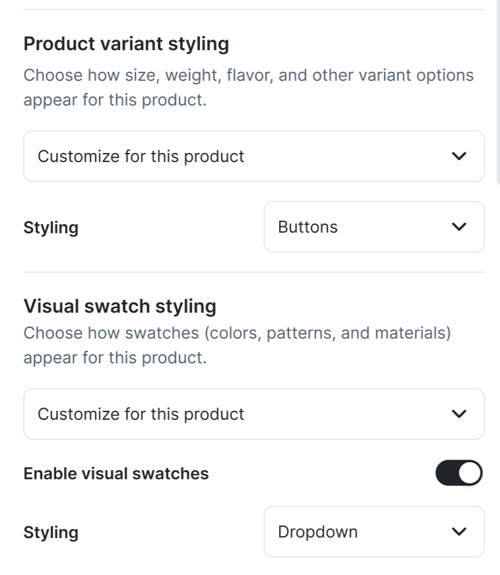
Make sure you Save & Publish any changes you've made, so it's reflected in your mobile app.
💡 Need Help?
We’re here for you! Visit www.reactiv.ai or reach out to our support team anytime for tips, troubleshooting, or personalized guidance.